______________________________
Eine Erweiterung für das SAP-Monitoring ist die SAP-Transaktion "RZ20, SAP CCMS Monitoring". Mittels des "SAP Profilers" lassen sich hier zusätzliche, also eigene Sensoren aus dessen Inhalten generieren. Hierzu sind folgende Schritte erforderlich:
- Auswählen Monitor-Set aus RZ20-Bestand
- Auswählen des eigentlichen Monitors
- Eingrenzen des gewünschten Wertes
- Abrufen Wert z.B. mit "Value" oder "Range"
- Mit Button "Define" neuen Sensor definieren
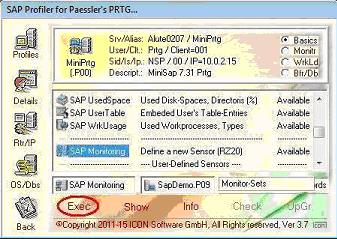
Der neue Sensor wird in der Übersicht im Profiler jetzt mit ausgewiesen und kann direkt, also interaktiv gestartet werden. Die Einplanung im Monitoring selbst erfolgt mit dem Sensor "SAP Monitoring.Exe" und den Parametern für das Profil sowie mit dem vergebenen Sensor-Namen. Siehe hierzu auch den Beitrag im Benutzerhandbuch.
Dateianhang:
Dateikommentar: Execution of the Sensor "SAP Monitoring"
RZ30.JPG [ 28.72 KiB | 506-mal betrachtet ]
RZ30.JPG [ 28.72 KiB | 506-mal betrachtet ]
Dateianhang:
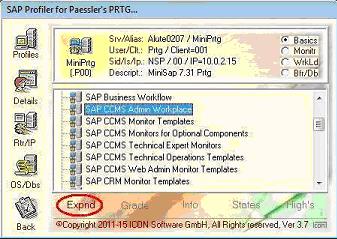
Dateikommentar: Expand a Monitor-Set for entries
RZ31.JPG [ 26.18 KiB | 506-mal betrachtet ]
RZ31.JPG [ 26.18 KiB | 506-mal betrachtet ]
Dateianhang:
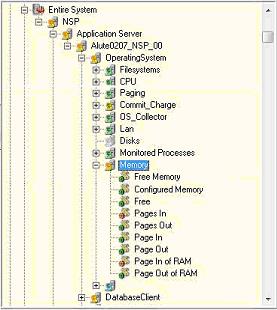
Dateikommentar: Select a special Monitor-Entry
RZ05.JPG [ 18.04 KiB | 515-mal betrachtet ]
RZ05.JPG [ 18.04 KiB | 515-mal betrachtet ]
Dateianhang:
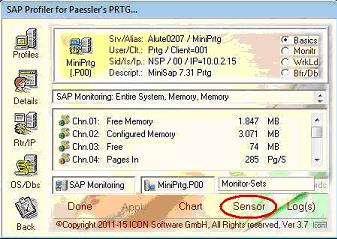
Dateikommentar: After execution with Button "Values"
RZ06.JPG [ 26.87 KiB | 515-mal betrachtet ]
RZ06.JPG [ 26.87 KiB | 515-mal betrachtet ]
Dateianhang:
Dateikommentar: Define a new Sensor with "Define"
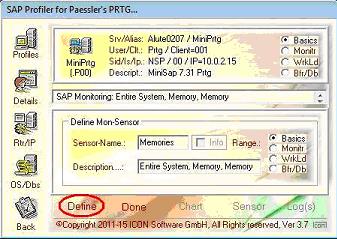
RZ07.JPG [ 26.13 KiB | 515-mal betrachtet ]
RZ07.JPG [ 26.13 KiB | 515-mal betrachtet ]
Dateianhang:
Dateikommentar: New Sensor "Memories" available
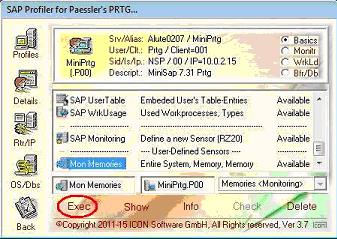
RZ08.JPG [ 28.57 KiB | 515-mal betrachtet ]
RZ08.JPG [ 28.57 KiB | 515-mal betrachtet ]
An enlargement for the SAP monitoring is the SAP transaction "RZ20, SAP CCMS Monitoring". By means of "SAP Profiler" additional, own sensors from his contents can be generated here. The following steps are necessary:
- Select monitor set from RZ20
- Select of the real monitor
- Select of the desired value
- To call the value, e.g., with "Value" or "Range"
- With the button "Define" new sensor
The new sensor is expelled in the overview in the Profiler now with and can be launched directly, so interactively. The planning in the monitoring occurs with the sensor "SAP Monitoring.Exe" and the parameters for the profile as well as with awarded sensor names. See the also article moreover in the user's handbook.