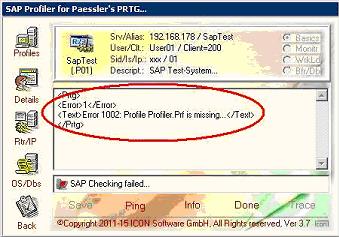
Message: "Profile Profiler.Prf is missing"
---------------------------------------------------------
Beim Auftreten der Meldung "Profile Profiler.Prf is missing" scheint es sich um ein Verzeichnis-Problem im Windows zu handeln. Es konnte kein temporäres Profil für den Zugriff auf SAP angelegt werden. Abhilfe: Es sollte überprüft werden ob die Datei "
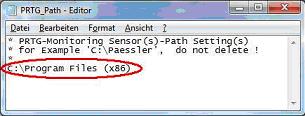
C:\Prtg_Path.Txt" angelegt worden ist. Die Datei enthält den Installationspfad (
ohne die Erweiterung "PRTG Network Monitor\Custom Sensors\ExeXml") zu PRTG und ist zwingend erforderlich (siehe Beispiel).
Weiterhin ist zu überprüfen ob sich die Lizenz-Datei "
SAP Licence.Lic", welche mit dem StarterPack ausgeliefert wurde, im Installationsverzeichnis befindet.
Dateianhang:
 Profile02.JPG [ 23.41 KiB | 273-mal betrachtet ]
Dateianhang:
 Path.Jpg [ 10.1 KiB | 273-mal betrachtet ]
It seems there is a problem with the directories within Windows. The temporary Profile could not be created. You should verify wheter the file "
C:\Prtg_Path.Txt" is created and available. The file is necessary and contains the installation directory (
without the string "PRTG Network Monitor\Custom Sensors\ExeXml") of PRTG (see Example).
Furthermore is to be checked whether to themselves the licence file "
SAP Licence. Lic " which was delivered with the starter stack in the installation directory is.