Sample: "Last ShortDump-Message"
________________________________
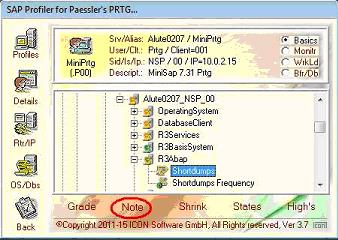
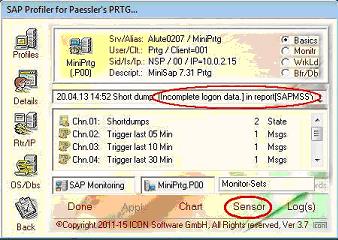
In dem hier aufgezeigten Beispiel wird ein Sensor gebildet, welcher die zuletzt erzeugte Meldung aus dem Systemlog von SAP aufzeigt. Hierzu wird der zugehörige Eintrag aus dem "
SAP CCMS Monitoring", also der Transktion "
RZ20" ausgewählt und dessen Ergebnis interaktiv aufgezeigt. Mittels des Buttons "
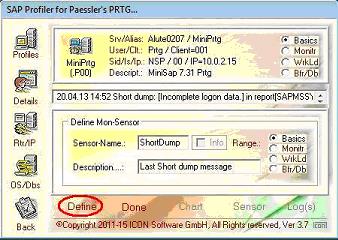
Define" wird ein neuer Sensor definiert.
Dieser neue Sensor kann dann direkt im Monitoring-System unter "
SAP Monitoring.Exe", dem Profil-Parameter und dem Namen "
ShortDump" eingeplant werden.
Dateianhang:
Dateikommentar: Select the entry "R3Abap - Shortdumps"
 RZ09.JPG [ 24.5 KiB | 666-mal betrachtet ]
Dateianhang:
Dateikommentar: Resulting by interactive execution "Note"
 RZ10.JPG [ 28.09 KiB | 666-mal betrachtet ]
Dateianhang:
Dateikommentar: Define the sensor as "ShortDump"
 RZ11.JPG [ 26.71 KiB | 666-mal betrachtet ]
In the example indicated here a sensor is formed which indicates the at last generated message from the system log of SAP. Moreover the accompanying entry from "
SAP CCMS Monitoring", so of the Transktion "
RZ20" well-chosen and dess result is indicated interactively. By means of the button "
Define" a new sensor is defined.
Then this new sensor can be included in the plan directly in the monitoring system under "
SAP Monitoring.Exe", with the profile parametre and the name "
ShortDump".