__________________________
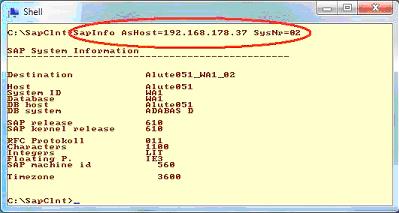
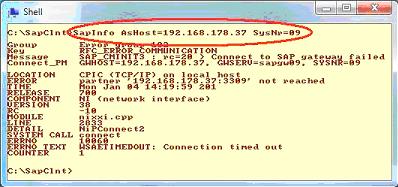
Falls der Zugriff über den SAP-Profiler auf das SAP scheitert so kann die RFC-Verbindung gegebenenfalls auch mit einem kleinen Hilfs-Programm "SapInfo.Exe" auf Command-Ebene überprüft werden. Dieses Tool ist im Installationsverzeichnis einzustellen und wird mittels der Command-Shell gestartet. Hierzu wird dieses mit den Parametern "AsHost=" (Hostname oder IP-Adresse) und "SysNr=" (Instanz Nr) gestartet und liest die allgemeinen Daten zum SAP aus. Scheitert der Zugriff so erfolgt eine entsprechende Fehlermeldung. Das Tool selbst sollte Teil der SAP-Installation sein.
Bild 01: Der erfolgreiche Zugriff mit der SAP-Instanz "02"
Bild 02: Der fehlerhafte Zugriff mit der SAP-Instanz "09"
Dateianhang:
Dateikommentar: Successful access with the SAP Instance "02"
SapInfo01.JPG [ 17.46 KiB | 876-mal betrachtet ]
SapInfo01.JPG [ 17.46 KiB | 876-mal betrachtet ]
Dateianhang:
Dateikommentar: Faulty access with the SAP Instance "09"
SapInfo02.JPG [ 21.01 KiB | 876-mal betrachtet ]
SapInfo02.JPG [ 21.01 KiB | 876-mal betrachtet ]
If the access about the SAP-Profiler on SAP fails so the RFC connection can be checked if necessary also with a small auxiliary programme "SapInfo.Exe" for Command level. This tool is to be put in the installation directory and is launched by means of the Command-Shell. Moreover this is launched with the parametres "AsHost=" (Hostname or IP address) and "SysNr=" (Instance No.) and selects the general data to SAP. If the access fails so a suitable error message occurs. The tool itself should be a part of the SAP installation.
Image 01: The successful access with the SAP Instance "02"
Image 02: The faulty access with the SAP Instance "09"